You may limit the report/memos to employees of a specific office or department or you may select employees from a list.
This report is designed for department managers so they may provide followup to urge the timely completion of time sheets for entry. Also, this report was designed to save paper. For daily employees, instead of printing each delinquent day down the page, those days are printed across the page for each week.
Select Time Accounting|Time Reporting|Delinquent Time Reporting.
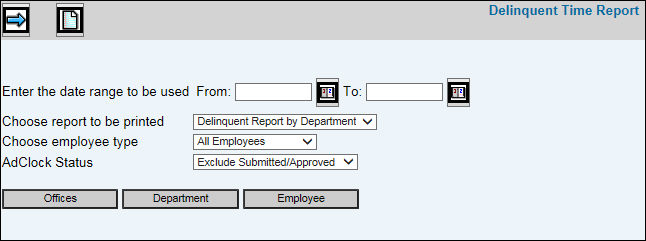
Delinquent Time Reporting Prompt
Key the From/To Date Range on which you want to report delinquent time.
Select the type of report you want printed.
Delinquent Report by Department
Delinquent Report by Name
Delinquent Memos
From the Choose Employee Type drop-down list, select All Employees, Full-Time Employees, or Part-Time Employees.
From the AdClock Status drop-down list, select Exclude Submitted/Approved or select Include Submitted/Approved. If you select Exclude Submitted/Approved, the inquiry excludes employees who have a submitted or approved timesheet but includes employees who have not yet submitted their timesheet during the specified time period.
If you select Include Submitted/Approved, the inquiry includes only employees who have a submitted or approved timesheet. It does not include employee's who have not submitted their timesheet during the specified time period. This inquiry serves as a notification to managers that the listed employee's timesheet has been submitted but needs to be approved and posted or that the timesheet has been submitted and approved but needs to be posted.
To limit information that displays, click any of the boxes and select items from the list. Only information pertaining to those selected items will be collected and displayed on the report.
Click
the Next icon  to display
the Printing
Selections Window.
to display
the Printing
Selections Window.