If you choose the Client/Bill Month format, billings are reported for each requested client by bill month, with subtotals by media for each bill month and for the client. Totals are reported for each client and for the billing and owning company/offices. Bill months are determined by the Bill Month settings on the billing profile defined in Profiles Definition.
When you request a recap for a client group, each client begins a new page of information.
To request the report:
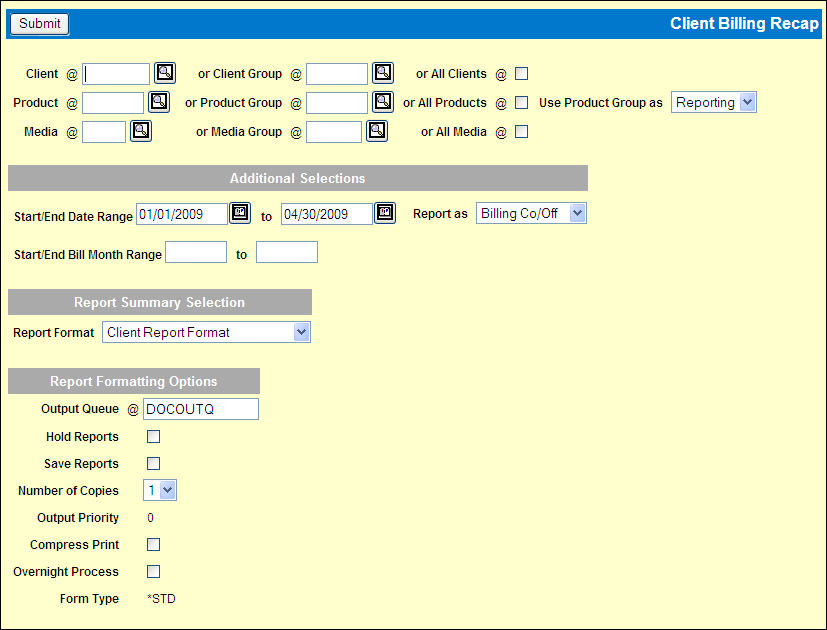
Select Reports|Client Billing Recap.
Key a Client code, Client Group code or click the All Clients check box to display a check.
Key a Product code, Product Group code or click the All Products check box to display a check.
If a product group is keyed, indicate how it is to be used by selecting from the Use Product Group as drop down list.
Reporting. Include all insertions for any products in the requested product group, regardless of whether they were bought as a product group or individually.
Allocation. Only include insertions defined for the requested product group.
Key a Media code, Media Group code or click the All Media check box to display a check.
Specify the date range for the report by keying a Start/End Date range of invoice dates to be included and/or by keying a Start/End Bill Month range to be included.
Accept the default of the Billing Co/Off in the "Report as" field to report data for clients billed by the signon company/office or select Owning Co/Off from the drop down list to request data for clients owned by the signon company/office.
Accept the default Client Report Format to show activity by invoice dates or select Client/Bill Month Report Format from the drop down list to show activity by bill month.
Complete the Report Formatting Options and click <Submit> to submit the report request.