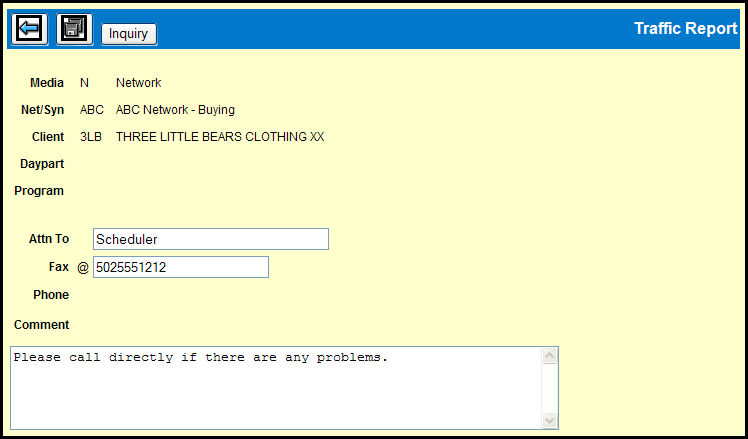
If you want to confirm or change the fax information from the Traffic Report Detail window or the Automatic Rotation window, click the Fax Detail button. By default, the Traffic Report Fax Detail window displays the fax information associated with the selected media, network/syndicator, and client.
Traffic Report Fax Detail Window
If the displayed information is correct, click the Back icon to return to the ISCI Rotation Definition Coordinator window.
If you want to change the displayed information:
Type a name in the Attn To field.
Type a number in the Fax field.
Type a comment in the Comment field.
Click the Save icon to save the changes.
If you want to choose from other saved fax detail information, click the Inquiry button.
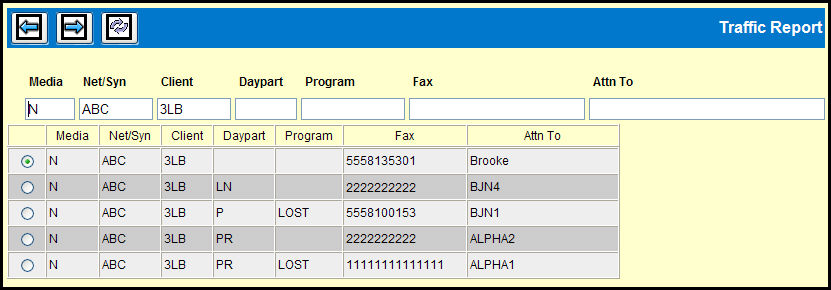
When you do, you'll see the Traffic Report Inquiry window.
You can narrow the display by keying in the fields at the top of the table and then clicking the Refresh List icon.
Select the option button adjacent to the row containing the fax information that you want to use.
Click the Back icon, to return to the Traffic Report Detail window or the Automatic Rotation window.