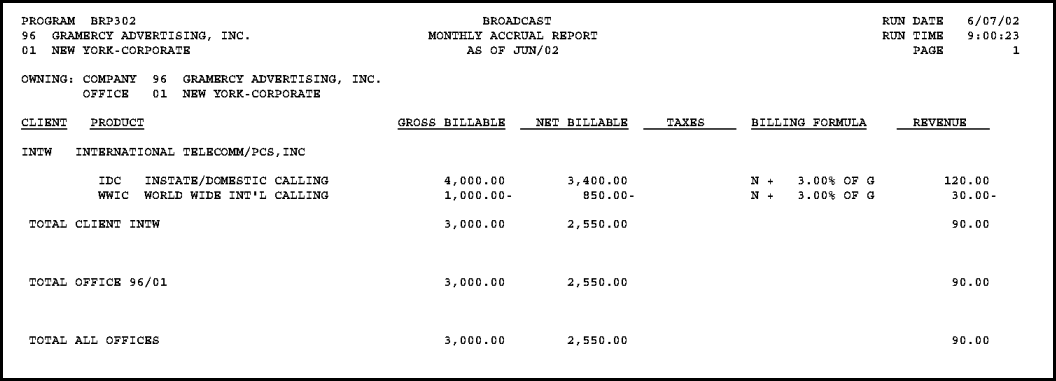
The Monthly Accrual Report is sorted by the owning company/office, client code, and product code. Each owning company/office starts on a separate page.
Barter and stewardship estimates are excluded. Taxes are also excluded since taxes are not reflected in the revenue amounts.
If you are using Dual Costing, note that this report shows costs based on the vendor cost. Thus, the Net Billable amount shown is the net billable at vendor cost not the true net of the Gross Billable at client cost.
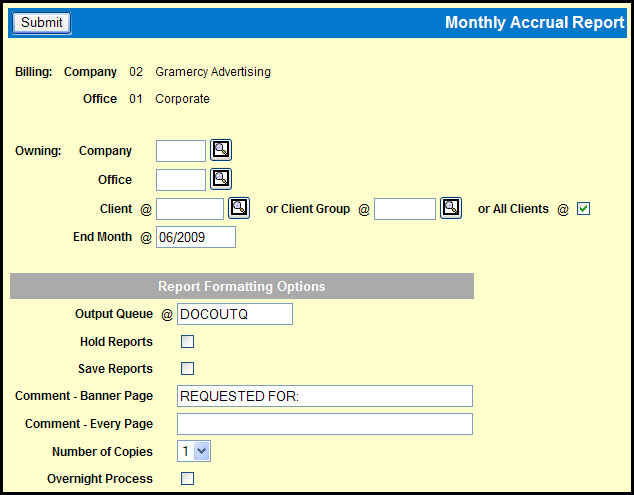
To view this report, select Media Accounting | Broadcast Media Accounting | Monthly Accrual Report.
Key or Lookup the Owning Company and Offices codes
Key or Lookup a Client, Client Group, or select the All Clients check box.
Accept the default End Month, which is the current month/year or key or use the Broadcast Calendar Lookup to specify a different month/year. The report retrieves data from broadcast months equal and prior to the month specified.
Complete the necessary fields in the Report Formatting Options section.
Click the Submit button.
Click the Reports icon in the MediaBank A|V toolbar to display the View Spool File window where you can access your report.